Canvas Guide
Ruler guide for pipeline
A canvas guide can be used to easily position / snap a
 2D Generator
, a
2D Generator
, a
 Shape layer
or a
Shape layer
or a
 Text layer
relative to it.
Text layer
relative to it.
Currently these can only be created in a
 Content Map
or in a
Content Map
or in a
 2D Scene Mapping
To create a guide, all you need to do is to :
- Click and drag the viewport’s vertical ruler to create a Vertical canvas guide
- Click and drag the viewport’s horizontal ruler to create a Horizontal canvas guide
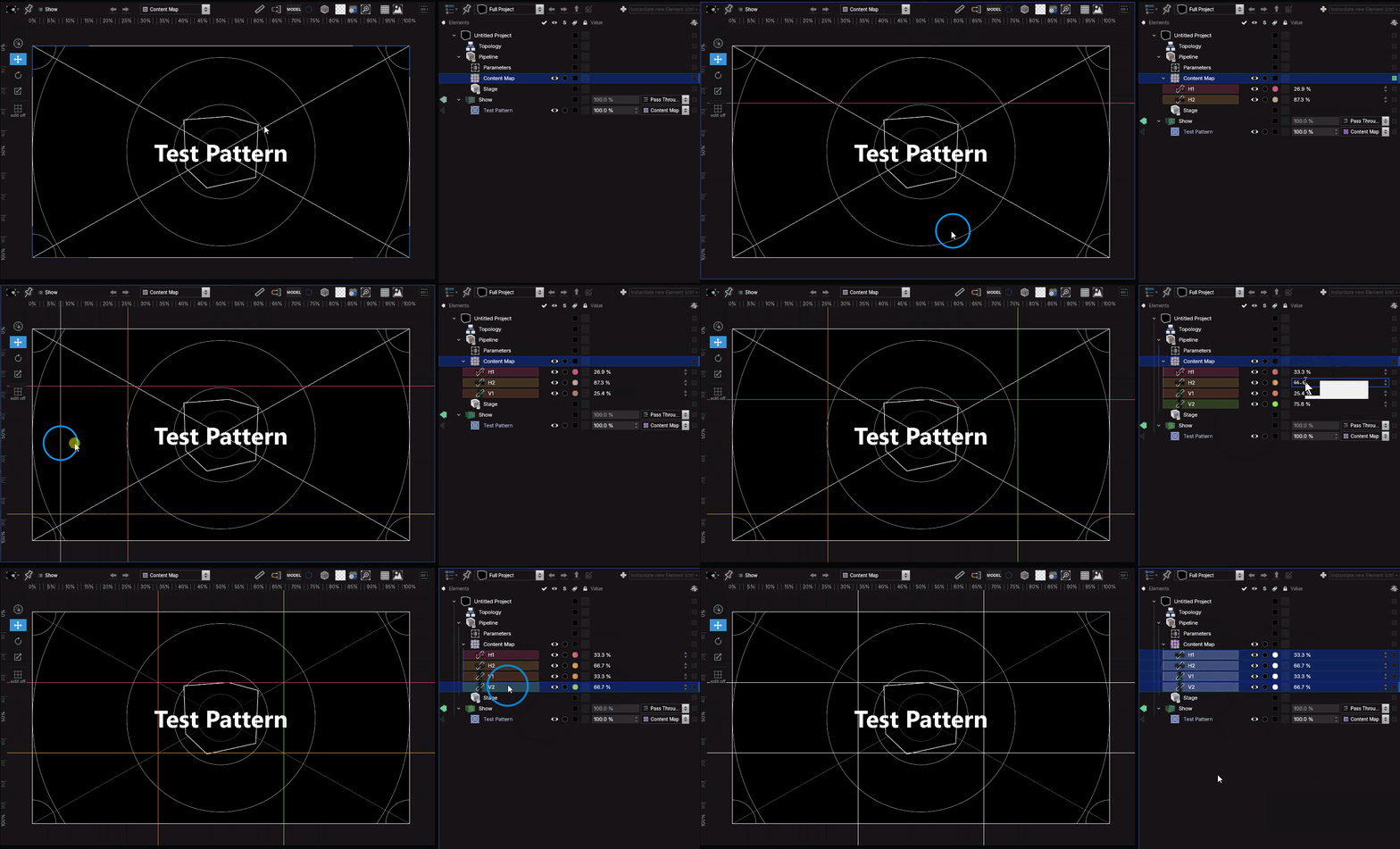
The line will be given a random color, wich you can change.
Also you can reposition the guide with it’s position parameter. The unit (% or px) will change depending on the Unit Selector .
You can link the position of any 2D layer to that of a Canvas Guide, wich can be very useful for easily repositionning many linked elements, by simply changing the guide’s position.